Link Building Tools: The Honest 2026 Guide (Which Ones Are Worth Your Money)
Link Building Tools: The Honest 2026 Guide (Which Ones Are Worth Your Money)
Here is the uncomfortable truth about link building: the people who win at it are not the ones who work the hardest. They are the ones who see the clearest. And seeing clearly, at scale, is exactly what link building tools are for.
Link building tools are software platforms that help you find link opportunities, judge link quality, contact website owners, and monitor the links you earn. They do not build links for you. They remove the guesswork and the grunt work — so your judgment lands where it actually matters.
This guide covers what link building tools do, the best tools in 2026, how to choose between them, what they cost, the best free options, and exactly how to build your first toolkit — with real data, not vendor hype.
1. What Are Link Building Tools?

A real workshop has a tool for every job. Link building is the same. Photo: wal_172619 / Pexels.
Imagine building a house with a single hammer. You could do it — eventually, badly, and with a lot of bruised thumbs. That is what manual link building looks like: one spreadsheet, one inbox, and a browser with forty tabs open.
Link building tools are the workshop. Each one does a specific job well.
Link building tools, in one sentence
Link building tools are software that helps you discover, evaluate, pursue, and protect backlinks — the links from other websites that search engines treat as votes of confidence.
The four jobs every tool does (or should)
The safest way to compare link building tools is to separate them by job: prospecting, backlink analysis, outreach, and link monitoring. A platform may claim to do everything, but teams usually get better results when they score each feature by data quality, workflow speed, reporting, integrations, and cost per useful link.
- Prospecting: finding relevant websites and pages that might link to you.
- Backlink analysis: judging link quality, studying competitors’ links, and finding gaps.
- Outreach: managing contacts, emails, follow-ups, and replies.
- Link monitoring: confirming earned links stay live and flagging problems.
What link building tools are NOT
They are not link vending machines. No legitimate tool sells you links, places links automatically, or guarantees rankings. Tools that promise that are selling spam — and spam is how websites get penalized. A real tool makes your work faster and smarter. It does not replace the work.
Who uses them?
Everyone from a solo blogger earning their first ten links to an agency managing hundreds of client campaigns. The tools change with scale, but the jobs stay the same. A freelancer might live inside one all-in-one platform. An agency usually runs a stack: one tool per job, connected by process.
The one thing to remember
A tool is only as good as the strategy behind it. The most expensive platform in the world will not save a campaign that targets the wrong sites with generic pitches. Buy the strategy first. Then buy the tools that serve it.
Real-World Proof: What Link Building Tools Look Like at Scale (Ahrefs)
You have the definition. Now — before the tool lists, the prices, the tutorials — let us look at the evidence.
Ahrefs sells link building tools. Its own website is the most fitting proof in this guide: a company whose entire business is helping people understand links, and whose own link profile is one of the strongest on the internet. If link building tools work, the company that makes them should have the profile to prove it.
Here is what that profile looks like in Semrush, US database, October 13, 2026:
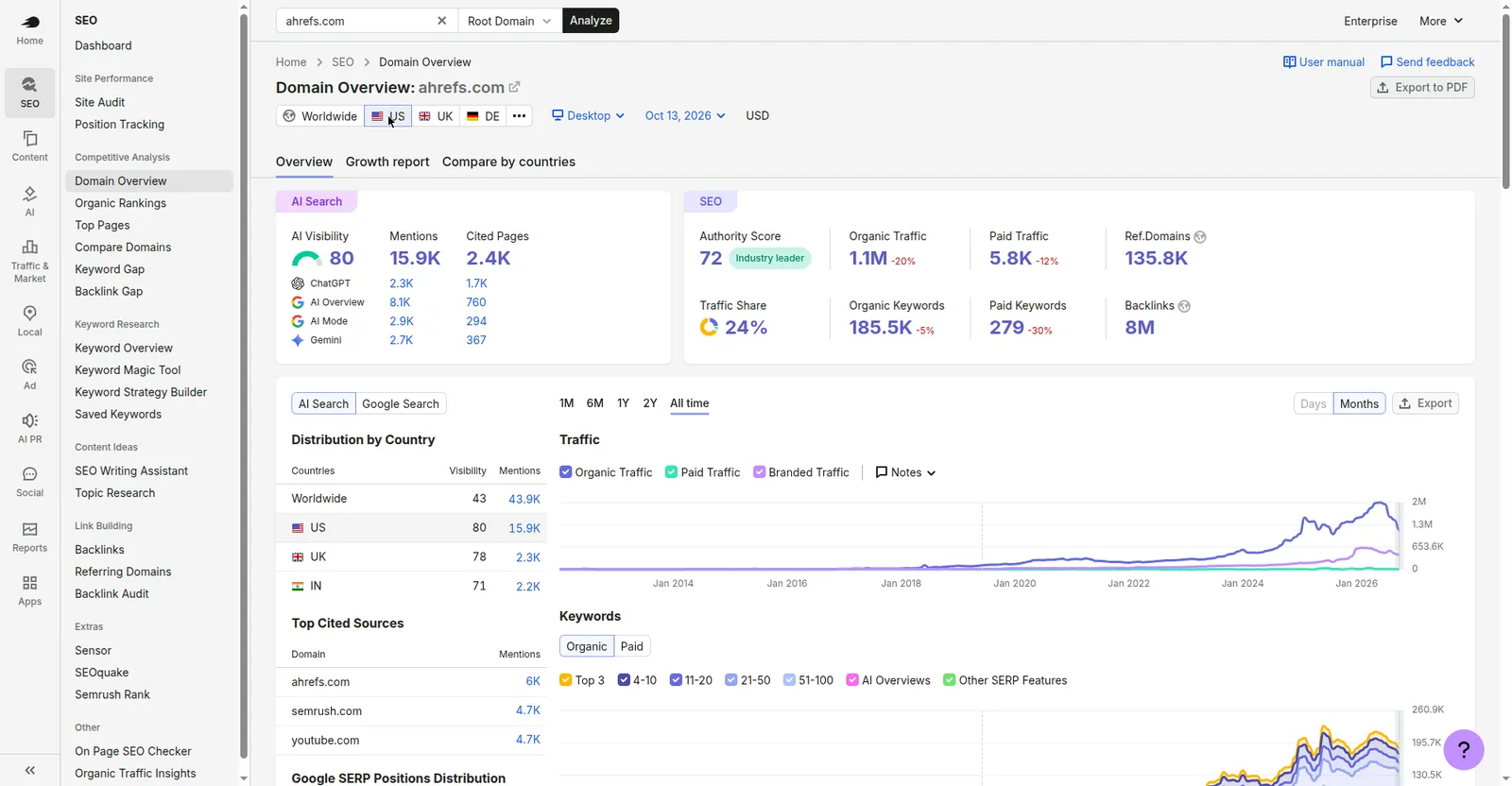
Semrush Domain Overview for ahrefs.com, US database, October 13, 2026. Screenshot 1 of 3.
- Authority Score: 72 — labeled “Industry leader”
- Monthly organic traffic: 1,145,487 (displayed 1.1M, down 20%)
- Referring domains: 135,843 (displayed 135.8K)
- Backlinks: 7,972,617 (displayed 8M)
- Organic keywords: 185,475 (displayed 185.5K, down 5%)
- Paid traffic: 5,817 (displayed 5.8K) — tiny next to 1.1M organic
- AI Search: AI Visibility 80, Mentions 15.9K, Cited Pages 2.4K
Now look at the shape of the growth:

Ahrefs’ organic traffic trend, All Time. Screenshot 2 of 3.

Ahrefs’ referring-domains trend, All Time. Screenshot 3 of 3.
The traffic curve stayed nearly flat until around 2020 — roughly 100K around 2019 (approximate, read from the chart axis) — then climbed steeply to a peak near 2.0M around late 2025 / January 2026 (approximate, from the chart axis). The referring-domains curve stayed flat until around 2019 — 33,015 in August 2019 (exact, from the chart tooltip) — then rose steadily to 135,843 by October 2026.
The honest twist
Read this carefully, because it is the most important lesson in this guide. Ahrefs — the company that sells link data — saw its own US organic traffic fall roughly 20%, from a peak near 2.0M to 1,145,487, while its referring domains kept growing to 135,843. Its paid traffic is almost nothing (5.8K), so this is not a paid-traffic story either.
So this is correlation, not proof that links alone caused the growth — or the fall. Ahrefs’ content, brand, product, and the shifting search landscape (including AI answers) all played a part. What the data does show is that even the best tools, the best data, and 135,843 referring domains do not immunize a site against traffic drops. Tools give you visibility. They do not give you immunity.
2. Why Do You Need Link Building Tools?

Without tools, you are guessing. With them, you are measuring. Photo: RDNE Stock project / Pexels.
Can you build links without tools? Yes — for a while. A new site earning its first ten links can do it with Google, a spreadsheet, and patience. But link building has a scaling cliff, and every serious campaign hits it.
Reason 1: Manual research stops working at scale
Finding relevant sites, locating contact emails, tracking which pitches were sent, following up, and logging placements consumes more time than actually producing the content that earns links. At ten links a month, spreadsheets work. At a hundred per month, you need automation handling prospecting, verification, and reporting — or you spend every working day on admin instead of strategy.
Reason 2: You cannot see your competitors’ links without them
Your competitors’ backlink profiles are public — but only to tools that crawl the web. Without a tool, you cannot see which sites link to them, which pages earn the most links, or where the gaps are. That is the single most valuable intelligence in link building, and it is invisible without software.
Reason 3: You cannot judge link quality by eye
A site can look professional and still be a link farm. A modest blog can carry surprising authority. Tools score domains by authority, traffic, spam signals, and link history — the difference between a link that helps and a link that hurts. Guessing gets expensive when one bad link pattern triggers a penalty.
Reason 4: Links disappear, and you need to know
Earned links get removed, pages get deleted, sites go down, and a followed link quietly becomes nofollow. Without monitoring, you discover losses months late — if ever. Tools alert you the day a link changes, while you can still do something about it.
Reason 5: Outreach without a system leaks opportunities
Every unanswered pitch, every forgotten follow-up, every lost reply is a link that died in your inbox. Outreach tools turn chaos into a pipeline: who was contacted, who replied, who needs a follow-up, who placed a link. The best link builders are not the best writers. They are the best follow-uppers — and follow-up is a system, not a talent.
Reason 6: Reporting proves the work
Whether you report to a client, a boss, or yourself, you need to show what was earned, what it is worth, and what changed. Tools turn months of outreach into a clean report: links gained, links lost, authority gained, traffic moved. Without that, link building looks like an expense. With it, it looks like what it is — an investment.
Reason 7: AI search changed the game
In 2026, rankings are only half the story. AI answers — ChatGPT, Google AI Overviews, Perplexity — now cite sources, and the sites they cite are overwhelmingly the ones with strong, trusted link profiles. Semrush’s Domain Overview now tracks AI Visibility, Mentions, and Cited Pages alongside traditional metrics, and Ahrefs itself shows an AI Visibility of 80 with 15.9K mentions. Tools have followed: most platforms now show which of your pages AI systems cite, and which competitor pages get cited instead of yours. If you are still measuring link building by rankings alone, you are grading half the exam.
3. What Are the Best Link Building Tools in 2026?

Two options, two trade-offs. The best tool is the one that fits your job. Photo: Artem Podrez / Pexels.
There is no single “best” link building tool. There is a best tool for each job. Below is the honest shortlist — the tools that consistently earn their place in real campaigns — with what each one is actually best at.
The comparison table
| Tool | Best for | Key strength | Starting price (approx.) |
|---|---|---|---|
| Ahrefs | Backlink research & competitor gaps | 35-trillion-link index, refreshed every 15–30 minutes; Link Intersect finds sites linking to competitors but not you | ~$129/mo |
| Semrush | All-in-one SEO + outreach | 43-trillion-link index plus a built-in Link Building Tool that manages prospecting to outreach | ~$140/mo |
| Majestic | Pure backlink intelligence | Trust Flow / Citation Flow — the specialist metrics for judging link quality | ~$50/mo |
| Moz Pro | Beginner-friendly authority tracking | Domain Authority + Spam Score — the simplest widely-understood quality signals | ~$49/mo |
| BuzzStream | Outreach & relationship management | Campaigns, sequences, contact history, and link monitoring in one pipeline | Mid-range, per-seat — check current pricing |
| Pitchbox | Outreach at scale | Multi-step sequences, personalization, and pipeline management for high-volume teams | Quote-based — check current pricing |
| Hunter | Finding contact emails | Domain search + email verification with confidence scoring | Free tier + paid plans |
| Google Search Console | Your own link data | Google’s own record of the links pointing to your site — free, and the ground truth for your profile | Free |
Starting prices are as reported in 2026 roundups and change often — verify current pricing on each tool’s site before budgeting.
Ahrefs: the link builder’s default
Ahrefs is the best-known SEO suite and, in survey after survey, the tool link builders trust most for backlink data. It describes its crawler as the web’s second-largest after Google’s. Its strengths are Site Explorer (any site’s full link profile), Link Intersect (the gap between you and competitors), and Content Explorer (finding pages worth replicating). Its weakness: price, and a credit system that can run dry on heavy-use months.
Semrush: the all-in-one
Semrush pairs one of the largest link indexes with the broadest marketing suite — keyword research, site audits, PPC data, and content tools alongside backlinks. Its dedicated Link Building Tool turns prospecting into managed outreach. Best for teams that want one subscription covering SEO end to end, not just links.
Majestic: the specialist
Majestic does one thing — link intelligence — and does it deeply. Trust Flow and Citation Flow remain the most respected specialist metrics for judging whether a link is worth pursuing. Best for link builders who want depth over breadth and already have other tools for keywords and audits.
Moz Pro: the friendly starting point
Moz’s Domain Authority is the metric most non-SEOs have heard of, which makes reporting easy. Its interface is the gentlest learning curve on this list. Best for beginners and small teams who need clear fundamentals without drowning in data.
BuzzStream and Pitchbox: the outreach engines
Analysis tools find opportunities. Outreach platforms convert them. BuzzStream and Pitchbox manage the human half of link building: contacts, sequences, follow-ups, replies, and placement tracking. If your bottleneck is organization rather than discovery, an outreach platform pays for itself faster than another data subscription.
Hunter: the email finder
Every outreach campaign dies without valid contact emails. Hunter finds and verifies professional email addresses by domain, with confidence scoring. Small, cheap, and essential — it is the tool inside almost every outreach stack.
Google Search Console: the free ground truth
Before you pay for anything, open Search Console. It shows the links Google actually records for your site, for free. It will not show competitors’ links or power outreach — but for auditing your own profile, it is the baseline every paid tool should be checked against.
What about AI-powered link building tools?
You will see a wave of tools claiming AI does link building for you: AI prospecting, AI-written pitches, AI “link placement.” Treat these the way you would treat any automation claim. AI is genuinely useful for the mechanical parts — summarizing a prospect’s site so your first line is personal, drafting subject-line variants, scoring prospect relevance from a list of five hundred. It is genuinely dangerous for the judgment parts — deciding which sites are trustworthy, writing the pitch that represents your brand, or placing links without human review. The rule: AI drafts, humans decide. Any tool that removes the human from the decision is a tool that will eventually embarrass you.
4. How Do You Choose the Right Link Building Tool?

Every tool is a direction. Pick the one that leads where you are going. Photo: Marlon Trottmann / Pexels.
Most people choose a link building tool backwards: they pick the famous one, then try to fit their workflow around it. Flip that. Start with your bottleneck, then buy the tool that removes it.
Step 1: Name your bottleneck
Which of these is actually slowing you down? Finding good sites to pitch. Judging whether a site is worth it. Finding contact emails. Managing follow-ups. Proving results. Each bottleneck maps to a different tool category — and buying the wrong category is the most common waste in link building.
Step 2: Match the tool to the job
- Bottleneck: “I don’t know where to get links.” → Backlink analysis (Ahrefs, Semrush, Majestic).
- Bottleneck: “I don’t know if a site is worth it.” → Quality scoring (Majestic Trust Flow, Moz Spam Score, Ahrefs Domain Rating).
- Bottleneck: “I can’t find contact emails.” → Hunter or an outreach platform with built-in discovery.
- Bottleneck: “My outreach is chaos.” → BuzzStream or Pitchbox.
- Bottleneck: “I don’t know what I already have.” → Google Search Console + monitoring alerts.
Step 3: Judge data quality, not database size
A huge link index means little if spam sites flood the results. Before committing, test the tool on ten sites you already know: five good, five bad. Does it score them the way your judgment does? If a tool calls a link farm “high authority,” its numbers are decoration.
Step 4: Check the workflow, not the feature list
A polished outreach tool is not enough if emails land in spam. A powerful analysis tool is not enough if exporting a prospect list takes three clicks per row. Use the free trial on a real campaign, not a demo. The right tool should cut wasted work — if it adds three clicks to tasks that should take one, it is the wrong tool.
Trial discipline
A trial is a test, not a tour. Before it starts, write down the three tasks you will run (for example: competitor profile, gap analysis, twenty verified emails) and the pass bar for each. Run them in the first three days, not the last three. If the tool passes, subscribe with evidence. If it fails, cancel with evidence. Trials that drift into “I’ll get to it” always end in a forgotten subscription — the most common tool expense in SEO is the one nobody remembers buying.
Step 5: Count the real cost
Sticker price is not the cost. Count seats, credits, overage fees, and the add-ons you will actually need. A $49 tool that charges per export can cost more than a $129 tool that includes everything. And a tool nobody on the team opens costs infinity per link.
The one-tool trap
No single tool does all four jobs brilliantly. The all-in-one platforms are strong on analysis and decent on outreach. The outreach platforms are brilliant at pipeline and weak at discovery. Accept the stack: most teams use one tool from each category, and that is not waste — it is specialization.
5. How Do You Find Link Opportunities With Tools?

Opportunities are out there. Tools are the binoculars. Photo: Maël BALLAND / Pexels.
Finding link opportunities is the highest-leverage job tools do. Here is the playbook, in the order professionals actually run it.
Method 1: Competitor backlink analysis
Enter a competitor’s domain into Site Explorer (Ahrefs) or Backlink Analytics (Semrush). Sort their referring domains by authority. Ask one question: “Which of these sites could plausibly link to us too?” Those are your warmest prospects — they already link to content like yours. Export the list, qualify it, and pitch.
Method 2: Link Intersect — the gap
Link Intersect shows sites that link to two or more competitors but not to you. This is the highest-probability prospect list in link building: these sites have already demonstrated they link to businesses in your space. If your content is genuinely comparable, you are not cold-pitching — you are completing their set.
Method 3: Broken link building
Run a broken-links report on a high-authority site in your niche. Find dead outbound links pointing to content similar to yours. Then pitch the site owner: “Your page links to a resource that no longer exists — ours covers the same topic and is live.” Commonly reported reply rates for broken link building run 8–12%, among the highest of any tactic, because you are offering a fix, not asking a favor.
Method 4: Content Explorer — find what earns links
Search a topic in Content Explorer and sort by referring domains. You will see which angles, formats, and headlines actually earned links — data roundups, free tools, original research, definitive guides. This is how link bait ideas get validated before you spend a week building them: make what the data says already works.
Method 5: Unlinked brand mentions
Set up a mentions alert for your brand. When a site mentions you without linking, that is the warmest outreach of all — they already know you and already wrote about you. A polite “thanks for the mention — would you mind linking it?” converts at rates cold outreach never will.
Method 6: Resource page prospecting
Resource pages are curated lists of the best links on a topic — and they exist in nearly every niche, from university libraries to industry associations. Use search operators like intitle:resources + your topic or inurl:resources + your topic to find them, then check their authority with your analysis tool. The pitch is simple: your content belongs on their list. Commonly reported reply rates run 3–7%, lower than broken link building — but the links you win tend to be stable, editorial, and long-lived, because resource pages are maintained rather than forgotten.
Qualify before you pitch
Every prospect list needs a quality pass before outreach: relevance to your niche, real traffic, a clean link profile, and no spam signals. A tool that finds 1,000 prospects of which 18% pass quality checks is worse than one that finds 400 with a 55% pass rate. The smaller, cleaner list saves hours and protects your sender reputation.
6. How Do You Run Outreach With Tools?

Outreach is a conversation, not a blast. Tools keep the conversation organized. Photo: Mikhail Nilov / Pexels.
Outreach is where links are actually won or lost. Tools do not write your pitches — but they make sure the right pitch reaches the right person at the right time, and that nothing falls through the cracks.
Step 1: Build the prospect list inside the tool
Import your qualified prospects into your outreach platform. Tag them by tactic (guest post, broken link, resource page), by priority, and by owner. A list without tags becomes a mess within a week. A tagged list becomes a pipeline.
Step 2: Find and verify contacts
Use Hunter (or your platform’s discovery) to find the right person — the editor, the content manager, the site owner — not the generic info@ address. Verify every email before sending. High bounce rates destroy sender reputation fast, and a burned domain takes months to rehabilitate.
Step 3: Personalize the first line, templatize the rest
The winning formula: one genuinely personal opening line (something specific about their site or a recent article), then a tight template for the pitch itself. Tools with personalization tokens and snippet libraries make this fast without making it robotic. Mass emails that read like mass emails get deleted like mass emails.
Step 4: Sequence follow-ups automatically
One follow-up is professional. Two is persistent. Three is the limit. Outreach platforms automate the sequence, pause when someone replies, and handle out-of-office and bounce logic. Commonly reported reply rates: guest post outreach 5–10%, broken link building 8–12%, resource page outreach 3–7%. Generic blasts perform far worse — personalization is not a nicety, it is the whole game.
Step 5: Track the pipeline, not just the sends
Move prospects through stages: contacted → replied → negotiating → placed → rejected. Your placement rate lives in the transitions. If replies are high but placements are low, your offer is weak. If sends are high but replies are low, your targeting or subject lines are weak. The pipeline tells you which.
What does a good outreach email actually look like?
Strip away the tools and this is the anatomy that works. Subject line: specific, short, no clickbait — “Quick fix for your [topic] page” beats “Link building opportunity!!!” every time. Opening line: one sentence proving you actually looked at their site. Ask: one sentence, one link, one reason it helps their readers. Close: one easy out — “If it’s not a fit, no worries at all.” Total length: under 150 words. The tools handle the sequencing, the tracking, and the follow-ups. This structure is the part no tool can write for you — and the part that decides whether anyone replies.
Step 6: Log the placement the day it lands
When a link goes live, record the URL, anchor text, date, and contact. This is your evidence for reporting — and your early-warning system if the link ever disappears. Link acquisition is a process, and the process ends at the logbook, not at the send button.
Outreach and PR: the same muscle
The line between outreach and PR is thinner than most people think. A pitch to a journalist and a pitch to a blogger use the same skills: relevance, evidence, brevity, follow-up. If you want the earned-media version of this playbook, see our guides to digital PR and guest posting and blogger outreach.
7. How Do You Monitor Backlinks and Fix Problems?

Links are assets. Assets need monitoring. Photo: Jakub Zerdzicki / Pexels.
Earning a link is half the job. Keeping it — and keeping your profile clean — is the other half. This is the quiet job tools do in the background while you sleep.
New backlink alerts
Set alerts for new backlinks to your domain. A sudden spike of new links is either a win worth celebrating (a piece went viral) or an attack worth investigating (a spam network pointed at you). Either way, you want to know the same day, not the same quarter.
Lost link alerts
When a link disappears or changes to nofollow, most tools flag it within days. The fix is often a single email: “Hi — I noticed our link was removed during your site redesign. Any chance of restoring it?” Link reclamation is the cheapest link building there is, because the relationship already exists.
Anchor text monitoring
Watch your anchor text distribution. A natural profile mixes branded anchors, naked URLs, generic phrases (“click here”), and a minority of exact-match keyword anchors. If one exact-match phrase dominates, that is over-optimization — the pattern search engines associate with manipulation. Tools surface the distribution so you can steer future outreach toward variety.
Toxic link audits
Every profile accumulates junk: spam directories, hacked sites, link networks. Audit tools score your links for toxicity and let you disavow the worst offenders through Google’s disavow tool. Disavow is a last resort — Google mostly ignores low-quality links on its own — but for a genuine penalty or a clear attack, it is the right lever, and the audit tool is how you build the file.
Competitor monitoring
Set alerts on two or three key competitors. When they earn a notable new link, you see it within days — and you can decide whether to pursue the same site. Competitor monitoring turns their wins into your prospect list, on autopilot.
The monthly check that matters
Once a month, open your backlink report and answer three questions: How many links did we gain? How many did we lose? Did anything toxic appear? That is the entire monitoring routine. Everything else is detail.
The reporting habit: what to show stakeholders
Clients and bosses do not care about your tool count — they care about outcomes. A good monthly link report fits on one page: links earned (with URLs and authority), links lost (with reasons), the profile’s direction (referring domains up or down), and next month’s target list. Lead with the links, not the metrics. One earned link from a site your reader respects is worth more in a report than a hundred rows of domain scores. Tools generate the data; your job is to turn it into a story a non-SEO can understand in ninety seconds.
8. How Much Do Link Building Tools Cost?

Budget for the job, not the logo. Photo: olia danilevich / Pexels.
The honest answer: anywhere from $0 to several hundred dollars a month, depending on what job you are buying.
The price tiers, honestly
- Free ($0): Google Search Console, free tiers of Hunter and others, and limited free plans from some suites. Enough to start and to audit your own profile.
- Entry paid (~$49–50/mo): Moz Pro Starter, Majestic Lite. Real data, real limits. Good for a small site or a solo operator.
- Professional (~$129–140/mo): Ahrefs Lite, Semrush Pro. The standard tier for serious link building. Full backlink data, competitor analysis, and enough credits for real campaigns.
- Team/agency (several hundred/mo): higher tiers plus a dedicated outreach platform (BuzzStream, Pitchbox) and email-finding credits. The cost of running link building as a business, not a hobby.
What actually drives the price
Three things: the size and freshness of the link index, the credit/row limits, and the number of seats. A cheap tool with a stale index is not a bargain — it is a blindfold. A pricey tool nobody opens is not an investment — it is a subscription. Price per useful link is the only ratio that matters.
The cost of the wrong tool
The most expensive tool is the one you pay for and do not use. Before upgrading, check your usage: are you hitting limits, or just assuming you need more? Many solo operators pay for professional tiers while using 10% of the features. Downgrade without guilt. The money you save buys outreach time, which is the thing that actually earns links.
Do paid tools pay for themselves?
One placement from a genuinely authoritative site can be worth more than a year of subscriptions — in rankings, referral traffic, and credibility. But that math only works if the tool is used. A $129 tool that produces one quality link a month is cheap. A $49 tool that produces nothing is expensive. Judge by output, not by price tag.
How agencies price tools into client work
If you sell link building, tools are not overhead — they are part of the service. Most agencies fold tool costs into monthly retainers rather than billing them separately, because clients pay for outcomes (links earned, authority gained), not for software seats. The practical rule: one mid-tier analysis subscription plus one outreach platform covers a small agency’s first ten clients. Price your packages to cover that stack with margin left over — and never let a client dictate which tool you use. The tool is your workshop, not their shopping list.
9. What Are the Best Free Link Building Tools?

Free is a starting point, not a strategy. Photo: Towfiqu barbhuiya / Pexels.
Free tools will not run a full campaign. But they will start one — and for a new site, “start” is everything. Here is the free stack that actually works.
Google Search Console — your own links, free
The Links report shows your top linked pages, top linking sites, and top anchor text — straight from Google. Use it to audit your profile, find your strongest pages, and spot links you did not know you had.
Google Alerts — free mention monitoring
Set alerts for your brand name and key phrases. When someone mentions you, you get an email. Mentions without links are the easiest outreach targets on the internet, and this costs nothing.
Hunter free tier — email finding
Hunter’s free plan gives a small monthly allowance of email searches and verifications. For a campaign sending twenty pitches a month, it may be all you need. When you outgrow it, the paid tier is one of the cheapest in the stack.
Free tiers and trials of paid tools
Most major suites offer either a limited free plan or a trial. Use trials deliberately: run a full competitor analysis and export everything during the trial window. A trial used on a real campaign is research. A trial used to click around is a wasted week.
Free browser extensions
Toolbars like MozBar and similar extensions show authority metrics while you browse. They will not replace a full platform, but they make manual prospecting dramatically faster: you can judge a site’s authority from the search results page instead of opening five tabs.
When free stops being enough
The moment you need competitor backlink data, bulk prospecting, or outreach at scale, free tools hit their wall. That is the honest line: free tools show you your profile. Paid tools show you everyone’s. Link building is a competitive game, and you cannot win a competitive game while only seeing your own side of the board.
10. How Do You Build Your First Link Building Toolkit?

Start small. Start this week. Photo: Jakub Zerdzicki / Pexels.
You now know the categories, the tools, the costs, and the methods. Here is the build order — one week, one stack, no overwhelm.
Day 1–2: Set up the free base
Verify your site in Google Search Console. Export your current links. Set up Google Alerts for your brand. Open a spreadsheet (or your outreach tool’s free tier) and log every link you already have. You now have a baseline — and most people skip this and regret it.
Day 3–4: Pick your analysis tool
Start one free trial of an analysis platform — Ahrefs or Semrush for most people, Majestic if links are your only focus. Run three reports: your own profile, your top competitor’s profile, and a Link Intersect gap. Export all three. You now have a qualified prospect list. Cancel or subscribe based on what the data actually did for you.
Day 5: Add email finding
Sign up for Hunter’s free tier. Find and verify contacts for your top twenty prospects. If your prospects’ emails are easy to find, you are in a friendly niche. If not, budget for a paid tier sooner.
Day 6: Set up outreach
Send your first five pitches. Not fifty — five. Personalized, one at a time, following the sequence in Chapter 6. Log every send, every reply, every placement. Five real pitches teach you more than fifty templates ever will.
Day 7: Set up monitoring
Turn on new-link and lost-link alerts. Schedule a monthly 30-minute review: links gained, links lost, anything toxic. This is the habit that separates people who build links from people who buy tools.
The starter stack, summarized
- Analysis: one paid platform (Ahrefs / Semrush / Majestic) — or a trial while you validate.
- Outreach: a spreadsheet at first; BuzzStream or Pitchbox when volume demands it.
- Email finding: Hunter free tier, then paid when you outgrow it.
- Monitoring: Google Search Console + alerts inside your analysis tool.
- Total starting cost: $0 to ~$140/month, depending on the analysis tier.
What not to buy yet
Do not buy automation that promises links. Do not buy five tools before you have sent five pitches. Do not buy the enterprise tier because it looks professional. The toolkit grows with the campaign — not ahead of it.
The 90-day roadmap
Month one: baseline, prospect list, first twenty pitches, monitoring on. Month two: double down on the tactic with the best reply rate, add your outreach platform if follow-ups are slipping, publish one link-worthy asset (a data roundup or free tool) to give pitches something to point at. Month three: review the numbers — reply rate, placement rate, links gained, links lost — then decide your first upgrade. A toolkit built this way is never guesswork. Every subscription you add answers a problem you actually felt.
The bottom line
Link building tools do not earn links. People earn links — by finding the right sites, judging them honestly, pitching them personally, and following up relentlessly. Tools just make that work visible, fast, and measurable. Pick the stack that fits your bottleneck, use it every week, and let the links compound. That is the whole game.
Link Building Tools — Frequently Asked Questions
What is the best link building tool?
There is no single best tool — it depends on the job. Ahrefs is the strongest for backlink research and competitor gaps, Semrush is the best all-in-one, Majestic is the best pure link-intelligence specialist, and BuzzStream or Pitchbox are the best for outreach management. Most serious teams use one tool per job rather than one tool for everything.
Are free link building tools enough?
Free tools are enough to start: Google Search Console shows your own links, Google Alerts finds brand mentions, and Hunter’s free tier covers small outreach. But free tools cannot show competitors’ backlink profiles or power bulk prospecting — the moment you need that competitive view, a paid analysis tool becomes necessary.
Do link building tools build links automatically?
No legitimate tool does. Real tools help you find opportunities, judge quality, manage outreach, and monitor results — but a person still writes the pitch and earns the link. Any tool that promises automatic link placement is selling spam, and spam is how sites get penalized.
How much should a beginner spend on link building tools?
A beginner can start at $0 with Google Search Console, Google Alerts, and Hunter’s free tier. When the campaign grows, budget roughly $49–140 per month for one analysis platform. Spend only when a specific bottleneck — finding prospects, judging quality, managing outreach — is actually slowing you down.
Can link building tools get you penalized?
The tools themselves cannot penalize you, but how you use them can. Using tools to mass-produce spammy links, buy placements, or automate manipulative anchor text can trigger a penalty. Used honestly — for research, outreach, and monitoring — tools reduce your risk by helping you avoid low-quality links.
Which link building tool is best for beginners?
Moz Pro has the gentlest learning curve and the simplest quality signals (Domain Authority and Spam Score). That said, a beginner with real ambitions often outgrows it within months — Ahrefs or Semrush have steeper learning curves but carry you from first link to agency scale without switching platforms.
Keep Reading: The Rankestra Link Building Library
- White Hat Link Building Guide — the safe, complete playbook
- Digital PR Link Building Guide — earn links through press
- Guest Posting & Blogger Outreach Guide — pitch-based link building
- Wikipedia Backlinks Guide — links from the world’s encyclopedia
- Niche Edits & Link Insertions Guide — links inside existing content
- Niche Link Building Guide — links that fit your industry
- Buying Backlinks Safely Guide — what to avoid, what to check
- Types of Backlinks — know what you are building
- Backlink Exchange — swaps, risks, and the honest math
- Authority Backlinks — links that actually move rankings
- Backlink Benefits — what links actually do for you
- Link Acquisition — how to earn backlinks that work
- Link Bait — content that earns links on its own
- Tech PR — press that moves the needle for tech companies
- Backlink Management: The 2026 Guide to Auditing, Monitoring & Protecting Your Link Profile
- Link Reporting: The 2026 Guide to Tracking, Measuring & Presenting Backlink Results
- How to Get Earned Media: The 2026 Guide to Coverage, Links & Brand Mentions
- High DA Backlinks: The 2026 Guide to Domain Authority & Link Quality
- How Much Do Backlinks Cost? The 2026 Pricing Guide
- Guest Post Outreach: The 2026 Guide to Pitches That Get Replies
- Niche Edits: The 2026 Guide to Link Insertions That Work
- Blog Submission Sites: The 15 Best Places to List Your Blog in 2026
- Web 2.0 Submission Sites: The 15 Best Platforms in 2026
- Link Outreach: How to Earn Backlinks With Outreach in 2026
- Outsource Link Building: The Honest 2026 Guide
- Backlink Submission: The Honest 2026 Guide
- Link Building Specialist: The Honest 2026 Guide
- SEO Outreach Service: The Honest 2026 Guide
- Blogger Outreach Service: The Honest 2026 Guide
- Forum Submission Sites: The 15 Best Forums in 2026